
pbx-mcp is an open source MCP server that gives an AI assistant one tool surface for both Asterisk and FreeSWITCH. You ask a plain question, it runs the right command against whichever switch you configured, and hands back a readable answer. It is MIT licensed, installs with a single npx command, and is read-only until you say otherwise.
The project is open source and lives on GitHub at github.com/ictinnovations/pbx-mcp. Click here to install it.
Why we built it
If you run both platforms, you carry two vocabularies for the same job. Checking whether an extension is registered means pjsip show endpoints on Asterisk and sofia status profile internal reg on FreeSWITCH. Neither is hard. Both are one more thing to recall at 2am on a switch you last touched eight months ago.
MCP, the Model Context Protocol, is the open standard for connecting AI assistants to real systems. pbx-mcp speaks it, so an assistant can ask your PBX questions directly rather than guessing from documentation.
Where it sits
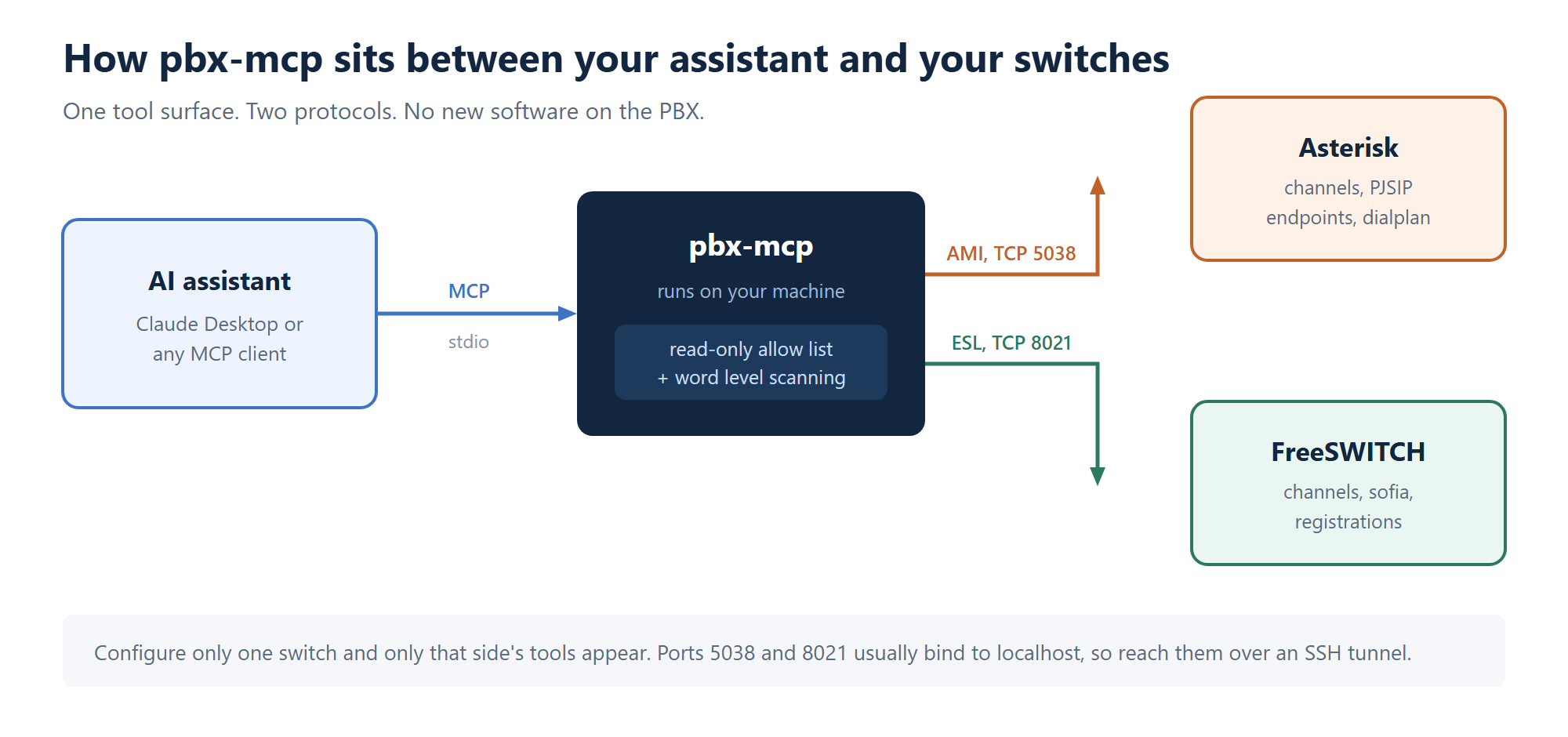
Nothing gets installed on the phone system. pbx-mcp runs next to your assistant, on your own machine, and talks to each switch over the management port it already exposes.
What it does
The useful part is not single lookups. It is chained ones. Ask why outbound calls to one country are failing and the assistant checks the switch is alive, checks whether the trunk registered upstream, lists recent channels to see how far calls get, and pulls the dialplan for that route. Four commands across two syntaxes, in the right order, without you holding the sequence in your head.
Ten read-only tools ship in the default mode. On Asterisk you get switch status, active channels, PJSIP endpoint state with a chan_sip fallback, dialplan lookups and a guarded CLI passthrough. On FreeSWITCH you get status, channels, sofia profile and gateway status, SIP registrations and a guarded API passthrough. Call control, meaning originate and hangup, brings the total to fourteen but stays switched off by default.
Safety came first
A PBX is not a scratch pad. A reload drops every registration on a profile, and an originate on a live trunk is a real call with a real bill attached. So the guards are layered:
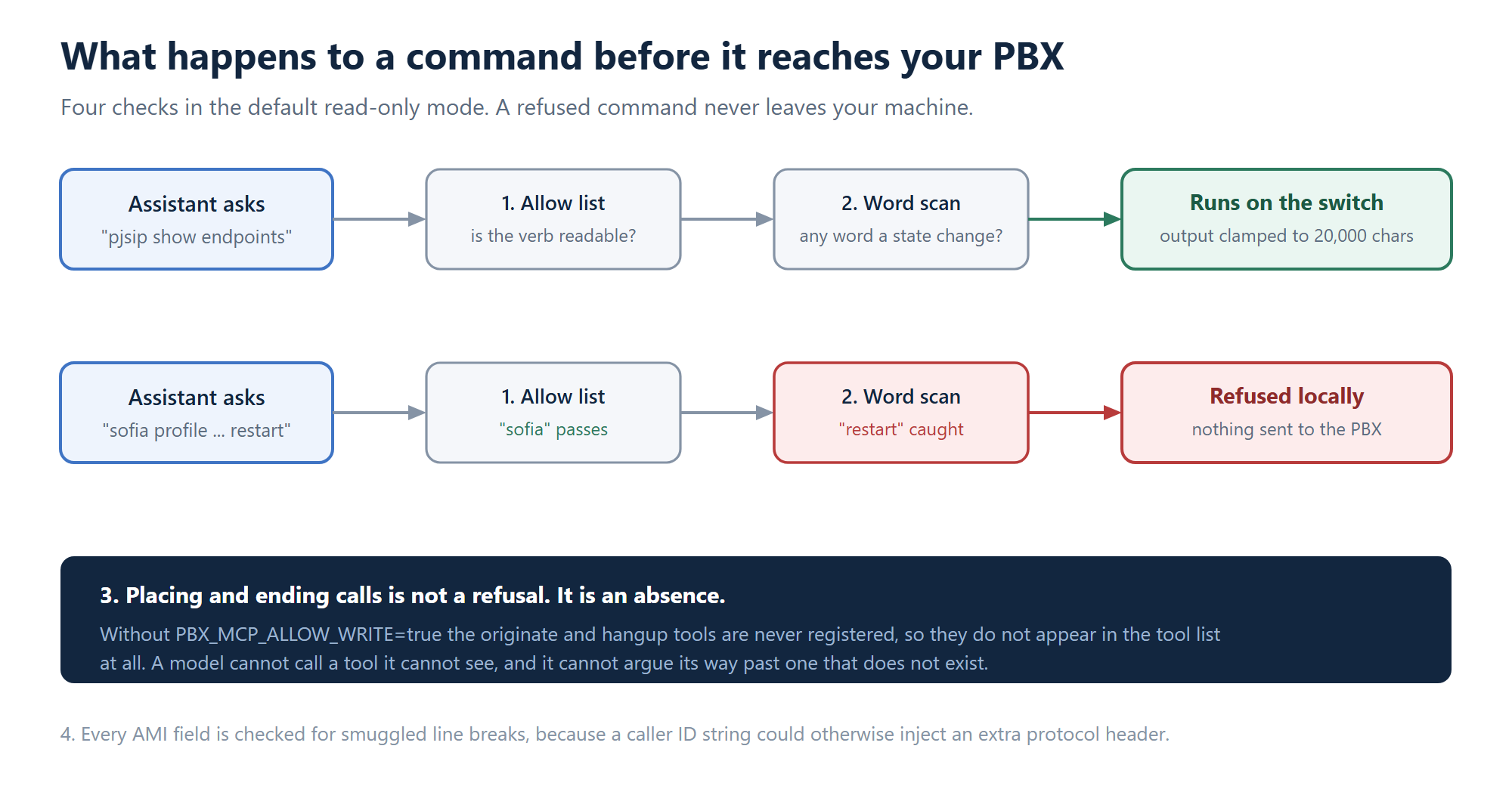
- Read-only by default. CLI and API passthroughs check every command against an allow list.
- Word level scanning. On FreeSWITCH,
sofiais allowed butsofia profile internal restartis not. Every word gets checked, so a prefix match cannot wave a state change through. - Write tools are not registered at all unless you set
PBX_MCP_ALLOW_WRITE=true. A model cannot call a tool it cannot see, so this is not a refusal it might argue around. The tool simply does not exist. - Header injection is blocked. AMI is newline delimited, so every field is checked for smuggled line breaks.
- Output is clamped at 20,000 characters, because one channel listing on a busy switch would otherwise fill the whole context window.
How it is built
Two protocol clients written from scratch, with no third party networking dependencies. AMI is a line protocol on TCP 5038 with ActionID correlation. ESL is TCP 8021 with a password handshake and Content-Length framed bodies. Both are framed text over TCP, so hand writing them keeps the install small and the behaviour predictable. The only runtime dependencies are the MCP SDK and Zod.
One bug from the build is worth passing on. The ESL client first emitted a frame the moment it saw the blank line ending the headers. That works until you list channels on a busy switch, the body spans several TCP segments, and you get a confidently truncated answer with no error at all. Reading Content-Length and waiting for the full declared body fixed it. Silent truncation is the worst failure mode, because twelve channels looks exactly like twelve channels whether or not there were really ninety.
That groundwork is not new to us. The same AMI and ESL handling sits underneath ICTCore, the engine behind our telephony products.
Install it
npx -y pbx-mcpThen point your MCP client at it and set the host, username and password for whichever switch you run. Configure only Asterisk and you never see a FreeSWITCH tool, and the reverse holds too.
One thing catches most people. pbx-mcp runs on your machine, not on the PBX, so your machine needs to reach port 5038 or 8021 on the phone system. Most installs bind those to localhost. An SSH tunnel is the quick answer, and you should not open those ports to the internet.
Where to get it
The code is on GitHub and the package is on npm. The user guide covers PBX side setup for both platforms, with troubleshooting keyed to the actual error strings you will hit.
Star it, fork it, or open an issue if something does not work on your switch. Bug reports with the actual error string are the most useful thing you can send us.
FAQ
Does pbx-mcp work with Asterisk and FreeSWITCH at the same time?
Yes. Set the environment variables for both and it registers tools for both. Set only one and it registers only that side, so an Asterisk shop never sees FreeSWITCH tools in the list.
Can the AI change my PBX configuration?
No. It cannot edit configuration files at all. In the default read-only mode it cannot even place or end a call, because those tools are not registered. You have to opt in with an environment variable before they appear.
What Asterisk versions are supported?
Anything with a working Manager Interface. The endpoint tool asks PJSIP first and falls back to chan_sip peers on its own, so older boxes still answer without you changing any settings.
Which AI assistants can use it?
Any MCP client. Claude Desktop is the common one and the guide has a copy and paste config for it, but the protocol is open and other clients work the same way.
Is it really free?
Yes, MIT licensed. Use it commercially, fork it, ship it inside your own product. Issues and pull requests are welcome on GitHub.
More open source from ICT Innovations
pbx-mcp is the newest piece of a stack we have been publishing since 2005. Everything below is free to download and run:
- pbx-mcp gives AI assistants a read-only window into Asterisk and FreeSWITCH.
- ICTFax is a fax server covering web to fax, email to fax, T.38 and G.711, with a REST API. It is our most starred project.
- ICTDialer handles voice broadcasting, SMS, fax and auto dialling on FreeSWITCH.
- ICTCore is the framework underneath the others, with one API for calls, SMS, fax and email.
- ICTPBX Community Edition is the free edition of our PBX, built on ICTCore and FreeSWITCH.
The full list lives on our GitHub organisation and our projects page.
Our commercial products
If you would rather have the supported version, with the setup done for you:
- ICTPBX is our white label multi tenant PBX, built on ICTCore and FreeSWITCH. The Enterprise Edition includes an AI voice agent.
- ICTContact is contact centre and outbound campaign software, with AI Personas for voice agents shipping in version 6.5.
- ICT Exam is our cloud assessment platform, with AI grading for written answers and LTI integration for existing course systems.
Questions about any of these? Open a ticket and we will get back to you.