
You can benchmark a telephony voice agent in about ten minutes without touching its code. Install the harness, start your agent, point the harness at its AudioSocket port, and read four numbers. This guide covers what each command does, what the output means, and which part of your pipeline to open when a number comes back wrong.
The tool is tvbench, MIT licensed and installable from PyPI. If you want the reasoning behind the design first, we wrote that up separately in why we measure from the caller’s seat. This one is the practical half.
What you need before you start
A Linux machine and a voice agent that accepts AudioSocket connections. That’s the whole list. You do not need Asterisk running, you do not need a SIP trunk, and you do not need to instrument your agent, because the harness plays the role Asterisk would play.
The Linux requirement is not a preference. On Windows, asyncio.sleep(0.02) takes roughly 31 ms rather than 20, so the harness cannot pace caller audio accurately and every number it produces drifts. The tool runs there and warns you with a realtime ratio well under 1.0, but do not report those figures anywhere.
The four steps
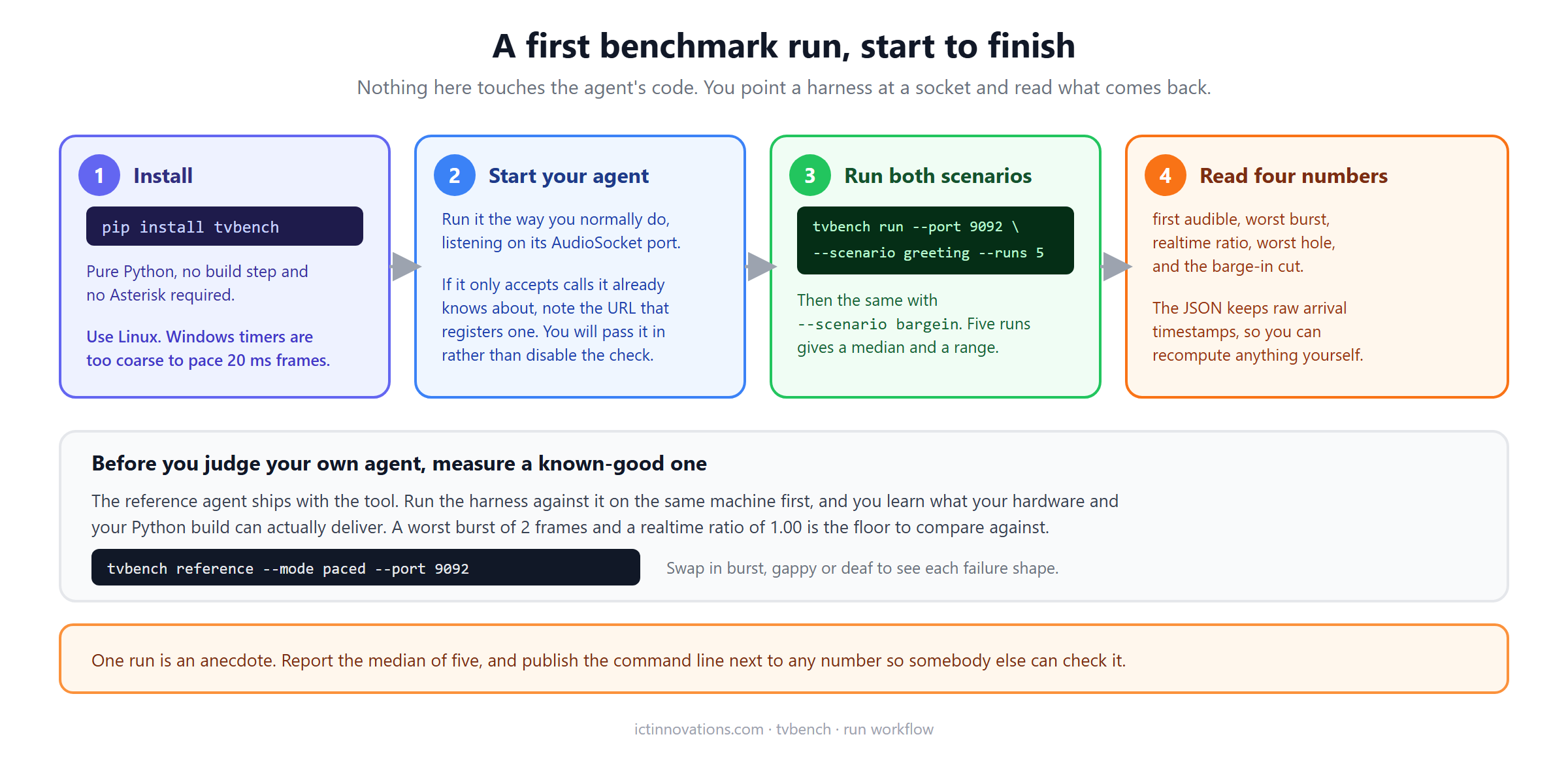
Install it into a virtual environment:
pip install tvbenchStart your agent however you normally start it, listening on its usual port. Then run the two scenarios:
tvbench run --host 127.0.0.1 --port 9092 --scenario greeting --runs 5
tvbench run --host 127.0.0.1 --port 9092 --scenario bargein --runs 5
Five runs is the default for a reason. Timing measurements on a shared machine vary, and a single run tells you very little. The report gives you a median and a range so you can see whether a number is stable or whether you caught one unlucky scheduling moment.
Measure something known-good first
Before you draw any conclusion about your own agent, find out what your machine is capable of. The tool ships a reference agent that paces correctly, and running against it establishes your floor:
tvbench reference --mode paced --port 9092On a Linux box with eight cores we get a worst burst of 2 frames and a realtime ratio of 1.00 from that. If your machine gives you 1.15 on the reference agent, then 1.15 from your own agent means nothing is wrong with your agent. This step takes thirty seconds and it prevents the most common way people misread a benchmark.
The same command takes --mode burst, --mode gappy and --mode deaf. Running each of those once is worth the two minutes, because you get to see the shape of each failure before you go looking for it in your own numbers.
If your agent has a call allowlist
Plenty of production agents refuse connections for calls they have not been told about. Ours does. That’s correct behaviour and you should not turn it off to run a test, because then you are measuring a code path that no real call takes.
Pass the registration endpoint instead. The harness posts the call id to it before connecting:
tvbench run --port 9092 \
  --register-url http://127.0.0.1:9091/register \
  --scenario bargein --runs 5 \
  --label "my-agent 1.2.0" --out results/my-agent.json
The --label is free text that lands in the output file, and it is worth filling in properly. Six months later, a result file that says which version and which machine produced it is evidence. One that says nothing is a curiosity.
Reading the output
Each run writes a JSON file containing the summary metrics and the raw arrival timestamps for every frame. The raw data is in there deliberately, so that anyone who disagrees with how a metric is computed can recompute it from the same recording rather than argue about method.
Four things are worth your attention, and each one points at a fairly small set of causes.
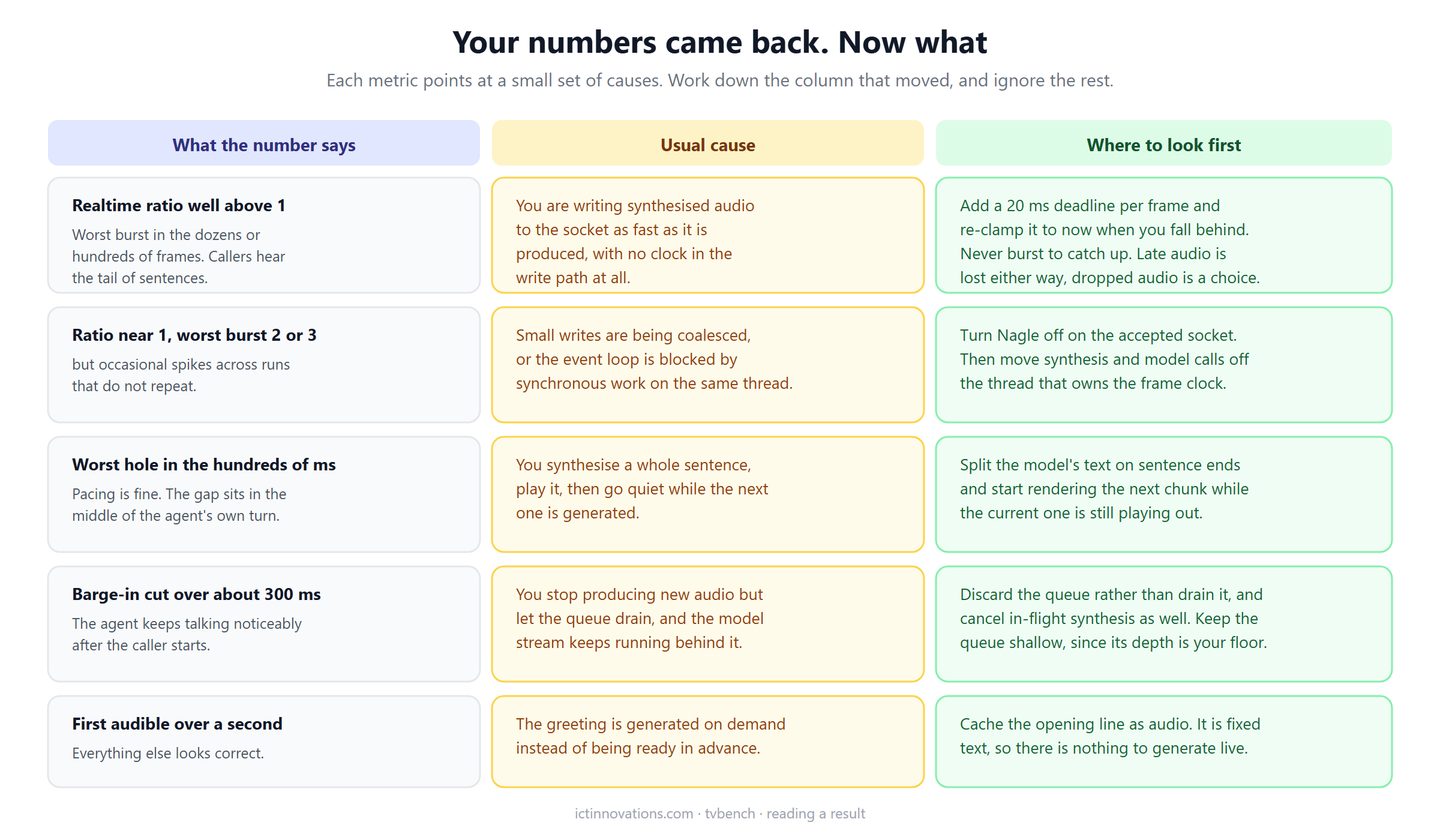
Realtime ratio well above 1
This is the common one and the expensive one. A ratio of 2764 means you delivered forty-six minutes of audio in a second of wall clock, which is what happens when synthesis output goes straight to the socket with no clock in the write path. The far end keeps a few frames and discards the rest, so the caller hears a fragment of the end of the sentence.
The fix is a deadline per frame. Write 320 bytes, add 20 ms to the deadline, sleep until it, repeat. The part people get wrong is what to do after a stall: if synthesis blocks for half a second and you compute the next deadline from where you should have been, your writer bursts to catch up and you’re back to dropping audio. Snap the deadline to the current time instead. Lateness cannot be recovered, but burst loss can be avoided.
Ratio near 1 with occasional spikes
Two usual suspects. The first is Nagle’s algorithm coalescing your small writes, which is exactly the pattern one 320-byte write every 20 ms triggers. Turn it off on the accepted socket and the spikes often disappear.
The second is blocking work on the thread that owns the frame clock. Speech synthesis, model calls and file reads all belong somewhere else. A pacer that gets descheduled for 80 ms produces a burst when it wakes up, and it will look intermittent because it depends on what else the box is doing.
Worst hole in the hundreds of milliseconds
Pacing is fine and the gap is inside the agent’s own turn, which points at how you chunk text for synthesis. If you render one sentence, play it, then go quiet while the next one renders, the caller hears that silence and reads it as the agent having finished.
Split the model’s streamed text on sentence boundaries and start rendering the next chunk while the current one is still playing out. In our own agent we also fall back to clause boundaries once a sentence runs past about 120 characters, because a long sentence with no full stop otherwise stalls the pipeline waiting for punctuation that never arrives.
Barge-in cut over roughly 300 milliseconds
Anything above a few hundred milliseconds is noticeable and anything in seconds makes the agent feel deaf. The number covers four stages: detecting the caller’s speech, deciding the turn is interrupted, dropping queued audio, and whatever was already handed to the far end and cannot be recalled.
Most implementations stop producing new audio and let the existing queue drain, which is the wrong instinct. Discard the queue. Cancel in-flight synthesis rather than letting it finish and throw the result away. And keep the queue shallow in the first place, because its depth is the floor on how fast you can possibly stop talking.
First audible over a second
If everything else looks correct and only the opening is slow, you are generating the greeting on demand. It’s fixed text, so there is nothing to generate live. Render it once at startup, keep the audio, and play it from memory.
What the numbers cannot tell you
The caller signal is band-limited noise modulated at roughly syllable rate. Voice activity detectors treat it as speech, which is all a timing test requires, but it is not speech. tvbench will not tell you anything about transcription accuracy and does not try. If you want a word error rate, use a real speech corpus and a tool built for that job.
Loopback is also not a network. Every number you get on one machine is a lower bound, because you have removed jitter, loss and the variable delay of a real path. If you care about behaviour under those conditions, add them yourself with a traffic shaper and rerun.
Putting it in continuous integration
The most useful thing you can do with this is stop treating it as a one-off. Timing regressions are easy to introduce and almost impossible to notice by ear, because the failure is usually intermittent and always sounds like something else.
Start your agent, run both scenarios, and fail the build if the realtime ratio leaves a sensible band or the barge-in cut exceeds your threshold. Pick thresholds from your own reference run rather than from ours, since they are hardware dependent. Our benchmark repository does the same thing to itself: eight assertions run on every commit, checking both that each injected defect still moves its metric and that the correct reference agent still passes cleanly. The second half matters more than it sounds, because a tool that flags healthy agents gets switched off within a week.
Publishing a result
The results/ directory in the repository takes pull requests. If you maintain a voice agent and you think our figures are wrong, unflattering, or measured badly, a run of your own with the command line attached settles it faster than a discussion will.
Releases are archived on Zenodo with a DOI, so cite the version you ran. A concept DOI always resolves to the newest release, and a version DOI pins the exact one your number came from, which keeps a published result meaningful after the tool moves on.
Frequently asked questions
Do I need Asterisk installed to run the benchmark?
No. The harness plays Asterisk’s part in the conversation, so it connects to your agent directly over AudioSocket. No PBX, no SIP trunk and no dialplan are involved. That is also why a run takes seconds rather than requiring a lab.
Can I benchmark an agent written in Node, Go or Java?
Yes. The harness only speaks the AudioSocket protocol and knows nothing about what is behind the socket. If your agent accepts the connection and sends audio frames back, it can be measured, whatever it is written in.
My realtime ratio is 0.85. Is that bad?
It means you delivered audio slower than real time, so the caller heard gaps. Check the worst hole figure from the same run: if the hole is large, you have a synthesis stall rather than a pacing bug. If pacing is even but consistently slow, your frame clock is drifting, usually because something blocking shares its thread.
What barge-in figure should I aim for?
Under about 200 ms feels natural to a caller. Our reference agent that discards queued audio on interruption measures 97 ms, and the same agent with interruption handling removed measures 4,974 ms, so the range between good and bad here is enormous. Set your own threshold from a reference run on your own hardware.
Why five runs instead of one?
A single timing measurement on a shared machine is an anecdote. Five gives you a median and a range, which is enough to tell a real regression from one unlucky scheduling moment. Report the median and say how many runs it came from.
Does this work with chan_websocket instead of AudioSocket?
Not currently. The harness implements AudioSocket only. On the newer WebSocket channel driver Asterisk owns the playout clock and re-times frames for you, so several of the pacing failures this tool catches are not reachable there. We wrote about that difference in our voice agent engineering log, alongside the rest of our open source telephony projects.