
ICTERP Community is now public at github.com/ictinnovations/icterp. It’s eleven open source ERP modules for Odoo 19 Community, released under the LGPL-3, the same licence as Odoo Community itself. They add the things most people expect from an ERP and don’t get in the free edition: an app home page, payroll, your own branding, and a complete school, college and university suite.
We’ve been running these modules for customers for a while. Putting them on GitHub means you can read the code before you commit to it, run it on your own server for nothing, and hand it to any developer you like when you want something changed.
The gaps it fills
Odoo Community is a very good base. We build on it because the core is solid and the licence lets us. But if you’ve ever installed it for a school or a small business, you’ll know where it stops. The tiled app home page is Enterprise only. So is payroll. Everything carries the Odoo name and links back to odoo.com. And there’s nothing for education at all.
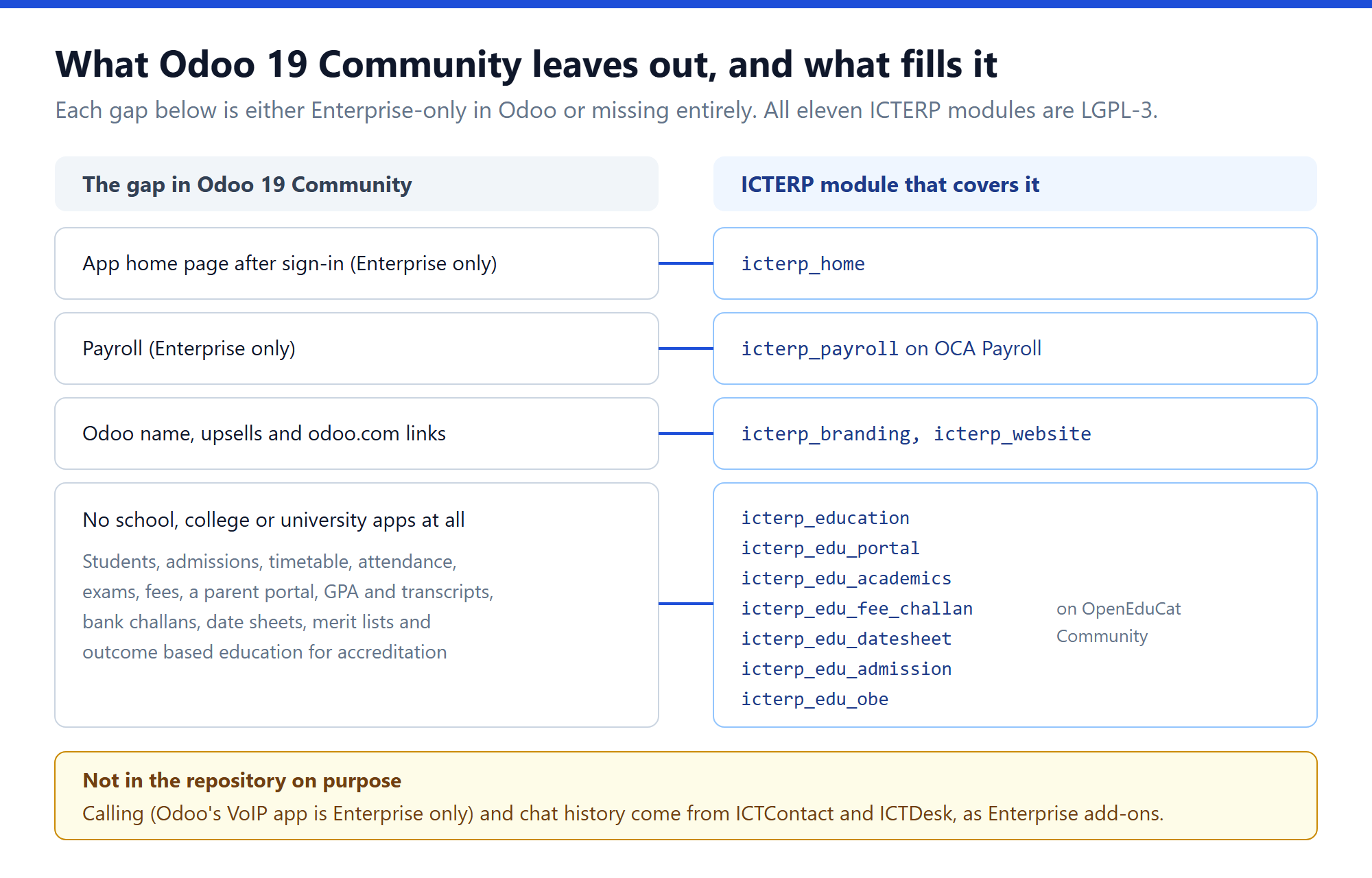
Here’s how the eleven modules split up:
- Core (3):
icterp_brandingswaps the name, colours, icons and email wording.icterp_homegives you a home page with app tiles grouped into sections you set up in Settings.icterp_websitekeeps the branded sign-in page and drops the Odoo generator tag when you install the Website app. - Education (7): students, admissions, timetable, attendance, exams, fees and library, plus a student and parent portal, course registration with GPA, CGPA and transcripts, bank fee challans with bank file import, exam date sheets with clash checks and seating plans, online admissions with entry tests and merit lists, and outcome based education (PEOs, PLOs and CLOs) with attainment reports for accreditation.
- HR (1):
icterp_payrollfor salary structures, payslips and payslip batches, built on OCA Payroll.
If you’ve been looking for a free school management system that also does accounting properly, this is our answer to that question. The education apps share one database with invoicing, so a fee challan and the invoice behind it are the same record, not two systems kept in step by hand.
How the repository is put together
We made one decision early that shapes everything else: the repository holds only our code. Odoo, OpenEduCat and OCA Payroll aren’t copied into it. You pull them yourself, at the exact versions we test against.
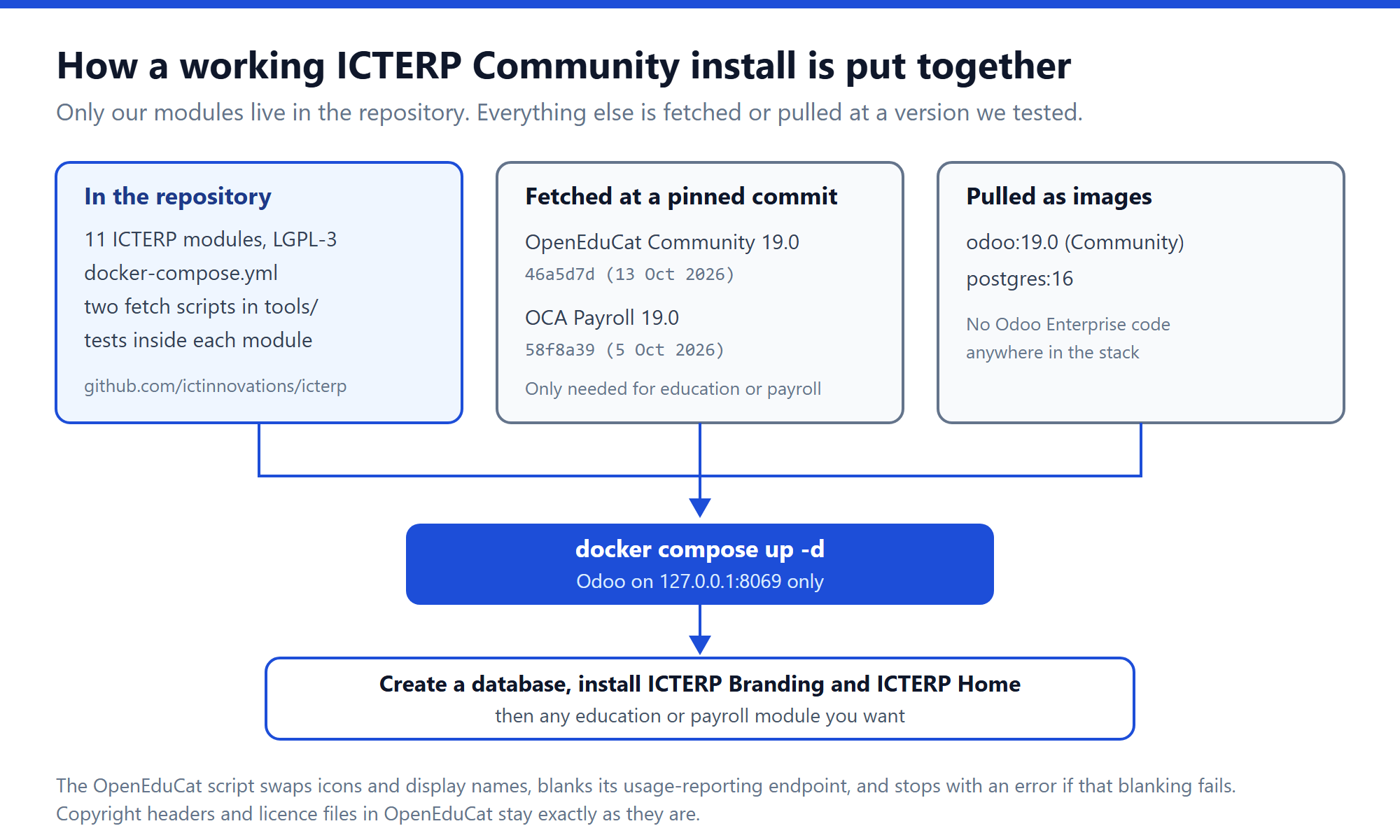
In practice that means:
- Odoo 19 Community and PostgreSQL 16 come from the official Docker images. There’s no Odoo Enterprise code anywhere in the stack, and you don’t need an Enterprise subscription for any of it.
- OpenEduCat Community is fetched by
tools/vendor-openeducat.shat commit46a5d7d(the 19.0 branch as of 13 October 2026). - OCA Payroll is fetched by
tools/fetch-oca-payroll.shat commit58f8a39(19.0, 5 October 2026).
Pinning matters more than it sounds. Both upstream projects move every week, and an education install that worked on Monday can break on Friday because a field got renamed upstream. With a pin, what you install is what we tested. When we move the pin, it shows up as a one-line change in the repository history.
The OpenEduCat script does change a few things, and we’d rather tell you exactly what than have you find out. It replaces the app icons, renames the apps from “OpenEduCat X” to “Education: X”, and removes the marketing pages from the app descriptions. It also blanks the endpoint OpenEduCat uses for its daily usage report, and it stops with an error if that edit doesn’t take. Copyright headers, author lines and the licence file are left exactly as they are. That’s what the LGPL asks of us, and it’s the right thing to do anyway.
Getting it running
You’ll need Docker, plus Python 3.10 or newer if you run Odoo outside it. The short version:
git clone https://github.com/ictinnovations/icterp.git && cd icterp
bash tools/vendor-openeducat.sh addons-vendor/openeducat
bash tools/fetch-oca-payroll.sh addons-vendor/payroll
cp .env.example .env
cp config/odoo.conf.example config/odoo.conf
docker compose up -d
Set the same database password in both copied files first. Skip either fetch script if you don’t need education or payroll. Then open http://localhost:8069, create a database and install ICTERP Branding and ICTERP Home before anything else. Odoo listens on 127.0.0.1 only in the shipped compose file, so you’ll need to put a reverse proxy in front if you want other people to reach it.
Every module has tests in its own tests/ folder, and the README shows how to run them against a throwaway database. If you send a pull request that changes behaviour, please add or update a test with it.
What isn’t in the repository, and why
Calling from the CRM, campaigns and website chat history aren’t here. Those come from our ICTContact and ICTDesk products, and the connectors that link them to ICTERP ship with ICTERP Enterprise alongside those products’ own licences. It’s the same split you’ll see across our other open source projects: the platform is open, and the commercial products it talks to keep their own terms.
Enterprise also covers the parts that are really a service rather than code: setting ICTERP up under your brand, support, monitoring and the yearly move to the next Odoo version. If you’d rather not run servers yourself, the ICTERP packages page has the details. If you’re happy running it yourself, the Community modules are free and stay free.
Credits
ICTERP wouldn’t exist without three other open source projects, and we want to name them properly:
- Odoo Community by Odoo S.A., LGPL-3, the platform and its business apps.
- OpenEduCat Community by OpenEduCat Inc., LGPL-3, the base of the education apps.
- OCA Payroll by the Odoo Community Association, LGPL-3, the engine behind ICTERP Payroll.
Odoo is a trademark of Odoo S.A. ICTERP isn’t affiliated with or endorsed by Odoo S.A.
FAQ
Is ICTERP Community free?
Yes. All eleven modules are LGPL-3. You can use them, change them and run them commercially. You only pay if you want us to set it up, support it, or add ICTContact and ICTDesk.
Which Odoo version does it need?
Odoo 19 Community with PostgreSQL 13 or newer. We test on the official odoo:19.0 image with PostgreSQL 16. We move ICTERP to each new Odoo Community version once a year.
Can I install just payroll, or just the home page?
Yes. Each module installs on its own, apart from its listed dependencies. Install ICTERP Branding and ICTERP Home, then add only what you need. The education modules need OpenEduCat; payroll needs OCA Payroll.
Does it include Odoo Enterprise code?
No. Nothing in the repository or the Docker stack comes from Odoo Enterprise. The home page and payroll are our own modules and OCA’s, written for Community.
How do I contribute or report a bug?
Open an issue or a pull request on GitHub. The contributing guide is short: one change per pull request, a test when you change behaviour, and Odoo 19 conventions for file layout. Please report security problems privately through our ticket desk rather than in a public issue.
Where are the user guides?
On icterp.com/support, with screenshots for each app, including payroll, fee challans, date sheets and the student and parent portal.
The code is at github.com/ictinnovations/icterp. Stars help other people find it, and issues help us make it better.