
TL;DR
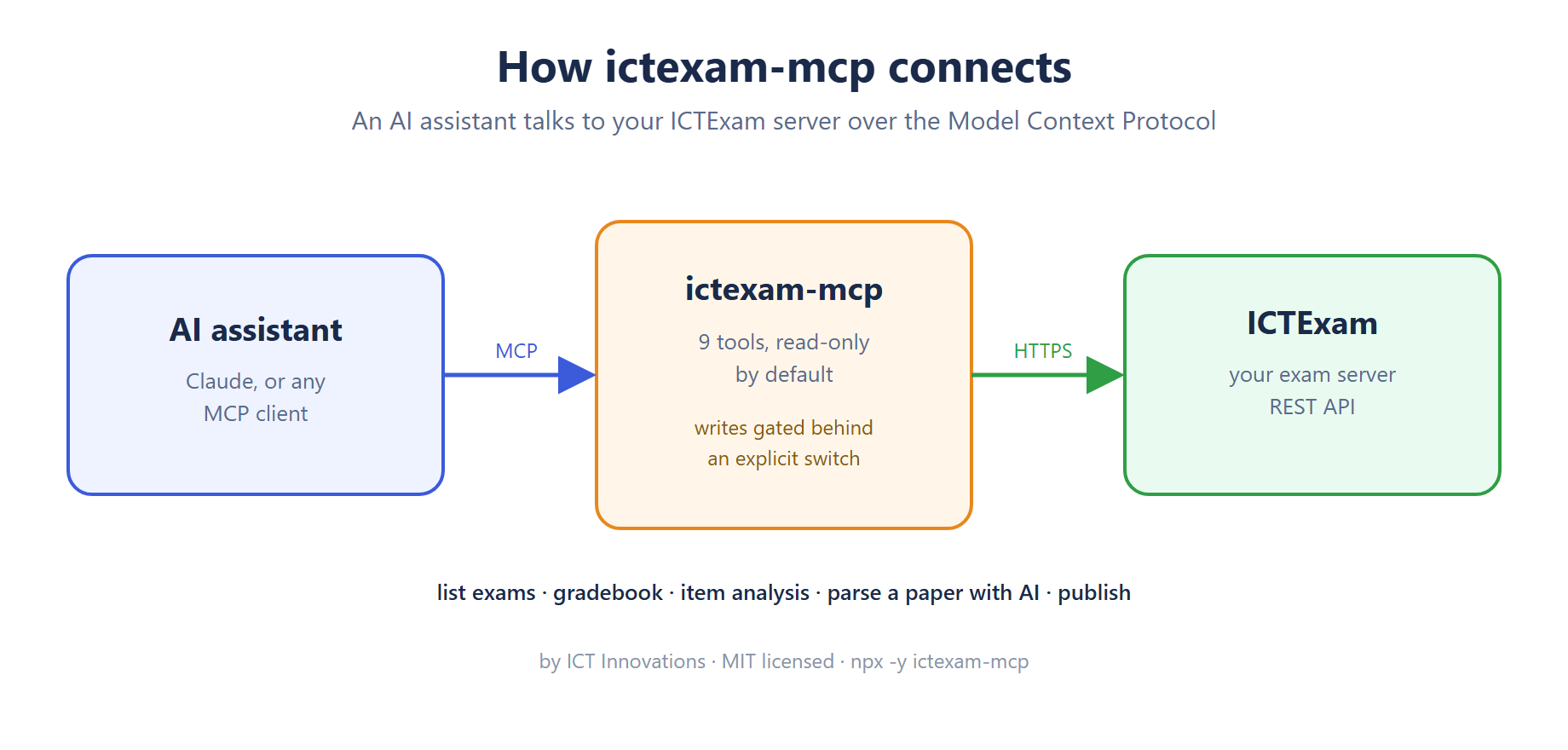
ictexam-mcp is an open source Model Context Protocol server for ICTExam, our AI exam authoring and grading platform. It gives an AI assistant nine tools: six that read exams, gradebooks and item analysis, and three that write, which stay unregistered until you set one environment variable. MIT licensed, on npm and in the MCP Registry. npx -y ictexam-mcp runs it.
We are opening up a line of Model Context Protocol servers for our stack, and this one covers assessment. Connect it to Claude Desktop, or any other MCP client, and the assistant can answer “which questions did my class struggle with?” straight from your ICTExam data, or take a PDF question paper and hand you back structured questions with marks and answers. This post is the longer version of the announcement: what the nine tools do, how the write gate works, what a parse call actually does under the hood, and what we found when we tested it against a live server.
Why an MCP server for an exam platform
The Model Context Protocol is an open standard for handing an assistant real tools rather than pasted text. Before it, getting an assistant to look at your gradebook meant exporting a CSV and uploading it into a chat. With ictexam-mcp connected, the assistant calls ictexam_gradebook itself, gets JSON back, and reasons over it. Teachers ask questions in plain language and the admin screens stay closed.
The honest reason we built it first, ahead of the telephony servers, is that assessment data is where an assistant adds the most obvious value. Item analysis in particular. Every published exam on ICTExam already computes per-question difficulty, p-value, average mark and how many responses earned full or zero credit. Almost nobody reads that table. An assistant will, and it will tell you that question 14 was either badly worded or never taught.
The nine tools
Six read tools are always registered. ictexam_list_exams lists papers with id, title, status, class and subject, and is where an assistant starts because every other tool wants an id. ictexam_get_exam returns one paper in full, settings, timing, share links and questions. ictexam_list_classes and ictexam_list_subjects cover the course structure. ictexam_gradebook returns the teacher gradebook, filterable by class or subject. ictexam_item_analysis is the one described above.
Three write tools exist only when you ask for them. ictexam_parse_question_paper uploads a local PDF or DOCX and has ICTExam extract the questions with AI. ictexam_publish_exam makes a paper live and returns the student and teacher share URLs. ictexam_unpublish_exam puts it back to draft. That last one exists so an assistant can undo the one before it.
The write gate is not a permission check
Plenty of tools ship “read only mode” as a flag that a write tool checks before it runs. We did it differently. When ICTEXAM_MCP_ALLOW_WRITE is unset, the three write tools are never registered with the MCP server at all. The assistant does not see them in its tool list, so it cannot call them, and there is no code path where a permissive prompt talks its way past a flag. The test suite pins this down: a read-only install must register exactly six tools and a write-enabled one exactly nine.
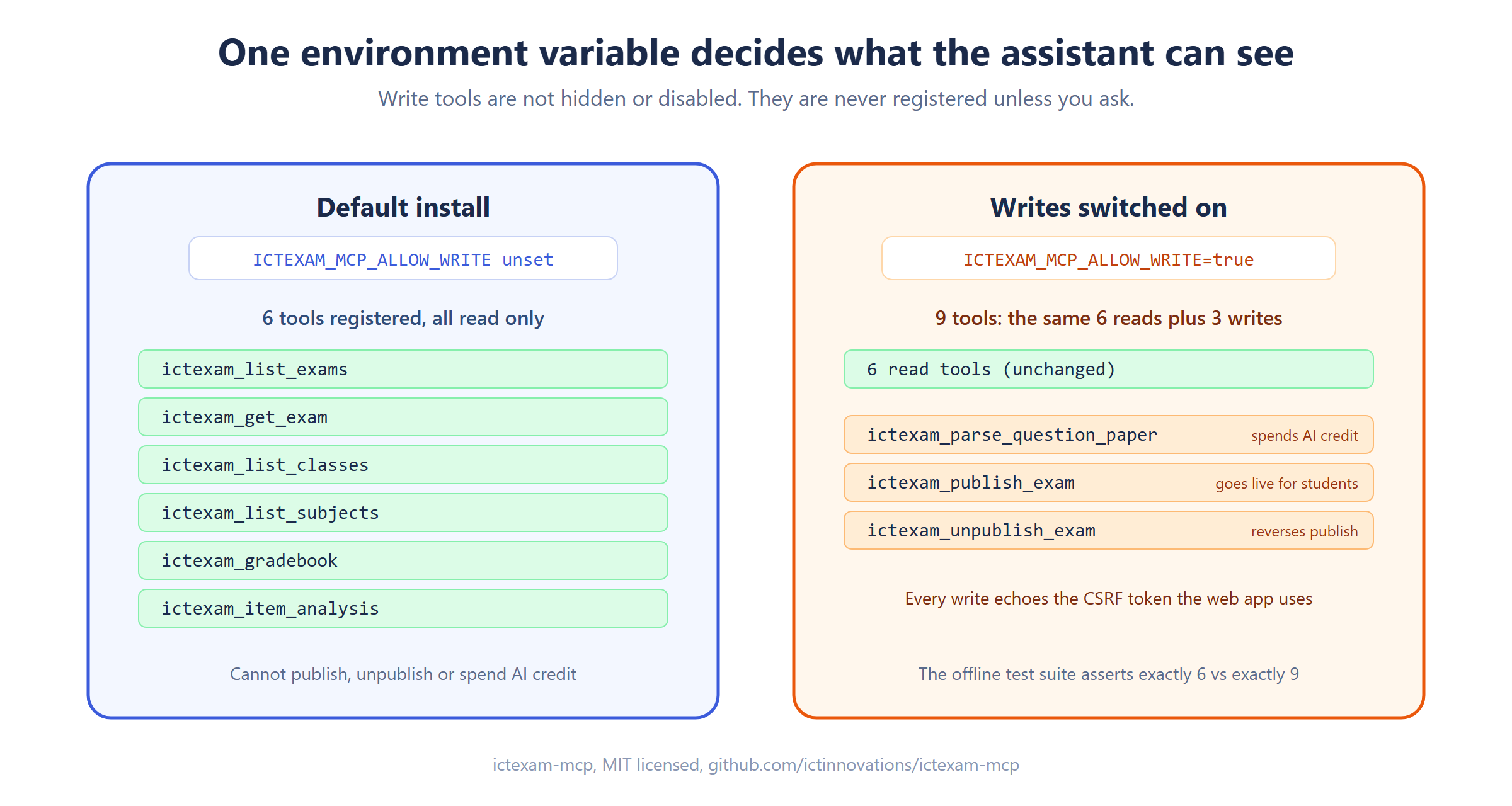
Why be this strict? Because the two things behind the gate cost something. Parsing a paper spends AI credit on your ICTExam server. Publishing puts an exam in front of students. Neither should happen because an assistant misread an instruction. I’d rather a teacher flip the switch on purpose than discover a paper went live during a chat about last term’s results.
Authentication is deliberately boring. The server signs in once with a teacher or admin account, keeps the session cookie for the life of the process, and echoes the CSRF token on every write, exactly the way the web app does. There is no API key to provision and the password never goes anywhere except the ICTExam login endpoint. One implementation detail worth knowing if you build something similar: Node’s fetch has no cookie jar, so the client tracks Set-Cookie headers itself. That took longer to get right than anything else in the codebase.
What a parse call actually does
From the assistant’s side, parsing is one tool call with a file path. Underneath, it is an upload, a background job and a polling loop, because AI extraction on a long paper is slow and an MCP call that blocks for two minutes is a bad experience.
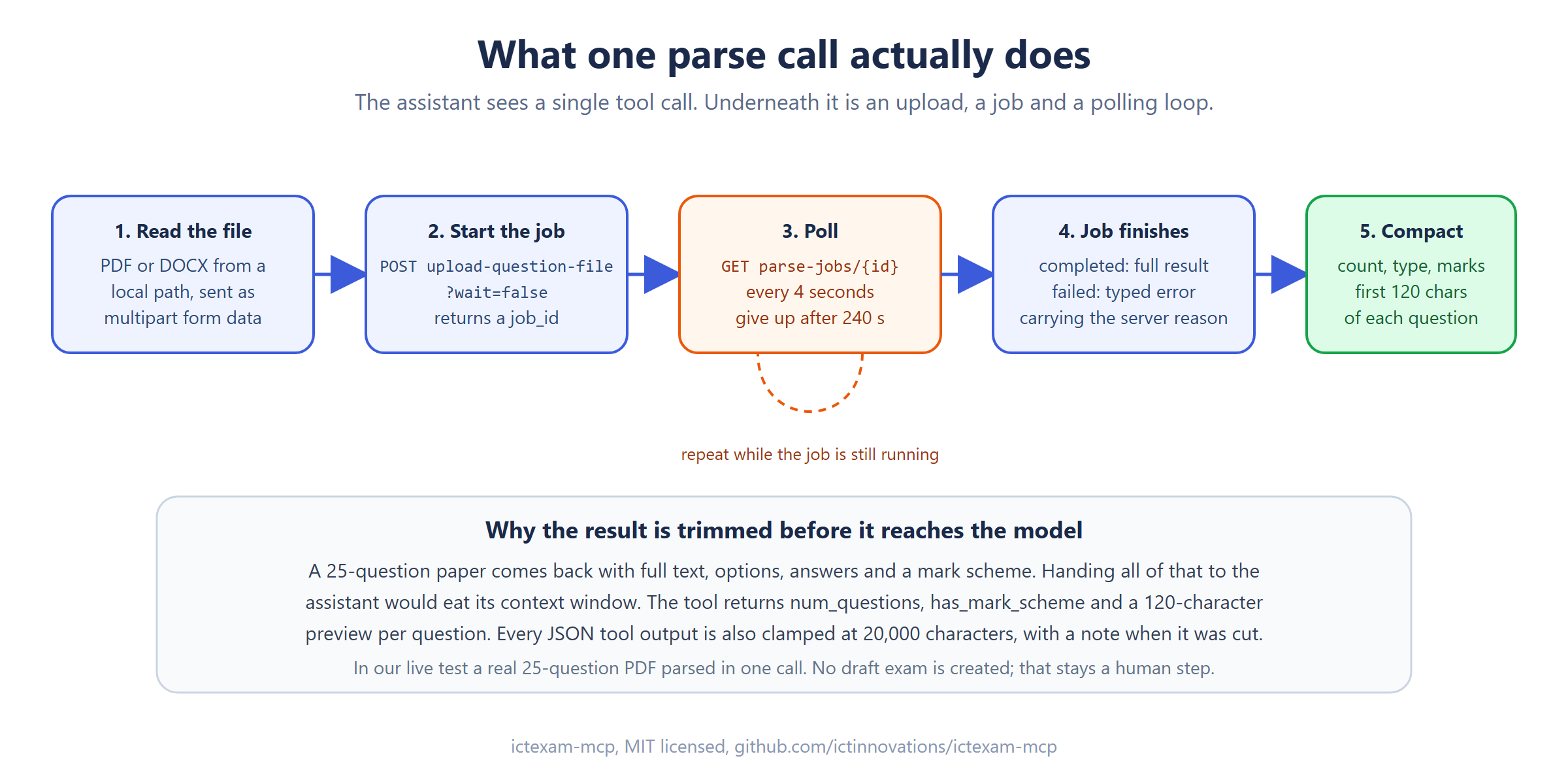
The client posts the file with wait=false, gets a job id, then polls every four seconds for up to 240 seconds. A failed job comes back as a typed error carrying the server’s reason, not a generic timeout. A completed job returns the full extraction, which for a real paper is large: every question’s text, options, correct answer, marks and any mark scheme.
We don’t pass all of that to the model. The tool returns the question count, whether a mark scheme was found, and for each question its type, marks and the first 120 characters of text. That is enough for the assistant to say “25 questions, 20 multiple choice, 5 short answer, mark scheme present” and ask what you want to do next. Every JSON tool result is also clamped at 20,000 characters with a note when it was cut, so no single call can flood the context window. Parsing does not create a draft exam. Saving the questions into a paper stays a human step in the ICTExam interface, on purpose.
What we verified before publishing
The offline test suite covers configuration and the write gate: six tests, run against the built output. Configuration fails loudly at startup if the base URL, email or password is missing, rather than on the first tool call ten minutes later. The API prefix defaults to /api for the usual reverse-proxied deployment and can be emptied to hit the backend directly.
Against a live ICTExam server we ran every read tool, a publish followed by an unpublish on a test paper to confirm the round trip, and a parse of a real 25-question PDF, which came back with all 25. We also did a stdio handshake from an MCP client in both modes and counted the tools: six, then nine. That handshake is the test that matters most, because it is what Claude Desktop does when it starts.
Publishing to the MCP Registry taught us one thing worth passing on. The registry rejects a server.json whose description runs past 100 characters with an HTTP 422, and the error is not obvious from the release workflow logs. Keep it short. We now apply that cap to every server in the line before the first release.
Install it
With Node 18 or newer there is nothing to install first:
npx -y ictexam-mcpGive it three settings, ICTEXAM_BASE_URL, ICTEXAM_EMAIL and ICTEXAM_PASSWORD, and add it to your MCP client. The README on GitHub has a ready-made Claude Desktop config block. Add ICTEXAM_MCP_ALLOW_WRITE=true only when you want parsing and publishing. The package is ictexam-mcp on npm and it is listed in the MCP Registry as io.github.ictinnovations/ictexam-mcp.
Where it fits
ictexam-mcp is one of three public integration points for ICTExam. The LangChain tools expose the same read surface to agent frameworks, and the Moodle activity module launches an ICTExam paper inside a course over LTI 1.3 with grade passback. All three are on GitHub under open licences, and the ICTExam integrations page explains which one you want.
It is also one of the MCP servers we have shipped across the stack, which between them cover our PBX, fax, contact center and CRM products, and they share the same shape: read-only by default, a single variable to unlock writes, cookie or token auth that mirrors the product’s own web app. There is a roundup of all of them and a matching one for the LangChain tools. The full list of what we publish lives on the open source projects page.
FAQ
Is it free? Yes. MIT licensed, source on GitHub, package on npm. ICTExam itself is a hosted service with a subscription, and the MCP server talks to whichever ICTExam instance you point it at.
Which assistants can use it? Any MCP client. We test with Claude Desktop, and the protocol is open, so other clients that speak MCP over stdio work the same way.
Can it change my data by accident? Not in a default install. The write tools are not registered unless ICTEXAM_MCP_ALLOW_WRITE=true is set, so the assistant cannot even see them.
Do I need an AI key? No. Paper parsing and grading run on the ICTExam server using its own configured model and credit. The MCP server only needs a login.
Does parsing create an exam? No. It returns the extracted questions to the assistant. Saving them into a paper and publishing it are separate, deliberate steps.
Where do I report issues? On the GitHub issue tracker. We read them, and pull requests are welcome.
First published 2 September 2026. Expanded 7 September 2026 with the write-gate and parse-flow details and diagrams.